All Minecraft mods

Improved Sleep

Set sleep rules that fit your world.

Let one friend sleep while the others keep building. Choose your sleeper requirement, wake time, and optional rewards in Mod Menu.

Customize in Mod Menu

Java Edition 26.3 · Fabric

Free · Made by Bearaujus · 1,026 downloads

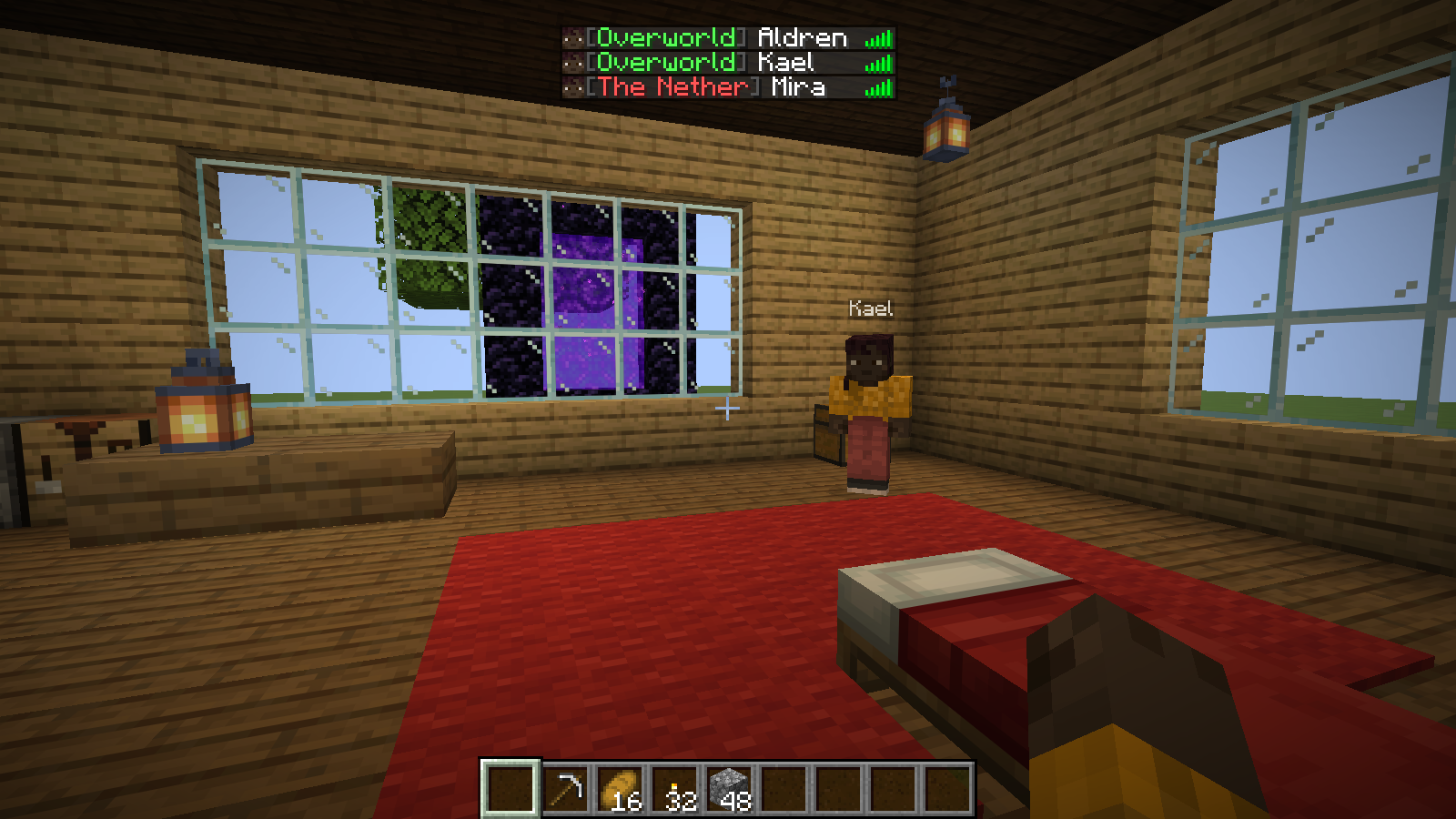
Mira lies in bed at night; Kael stands beside the work area.Gameplay screenshot
Before: Mira is the only sleeper. Aldren watches; Kael stays awake. One sleeper is required; rewards are off.
The same cabin viewpoint in daylight, with Mira awake beside the bed.Gameplay screenshot
After: the same world reaches morning. Aldren and Kael never needed to sleep.

Let one sleeper keep the night moving

Mira sleeps while Aldren watches and Kael stays awake. With one required sleeper, Improved Sleep brings morning even though the other two never enter bed.

Configured example · one sleeper required

Minecraft Java
26.3
Mod loader
Fabric
Mod version
0.1.9+26.3
View this release

In your world

See what changes

Choose a fixed count or percentage of sleepers and separate night, daytime and storm rules. These examples use one required sleeper; notifications come from the optional Sleep Wake-Up Notifier companion.

02

Give sleepers a reason to help

Optionally give temporary effects to the players who were in bed when the skip succeeded. Choose the effects, levels, and shared duration; rewards are disabled by default.

Optional example · Speed II enabled for one minute

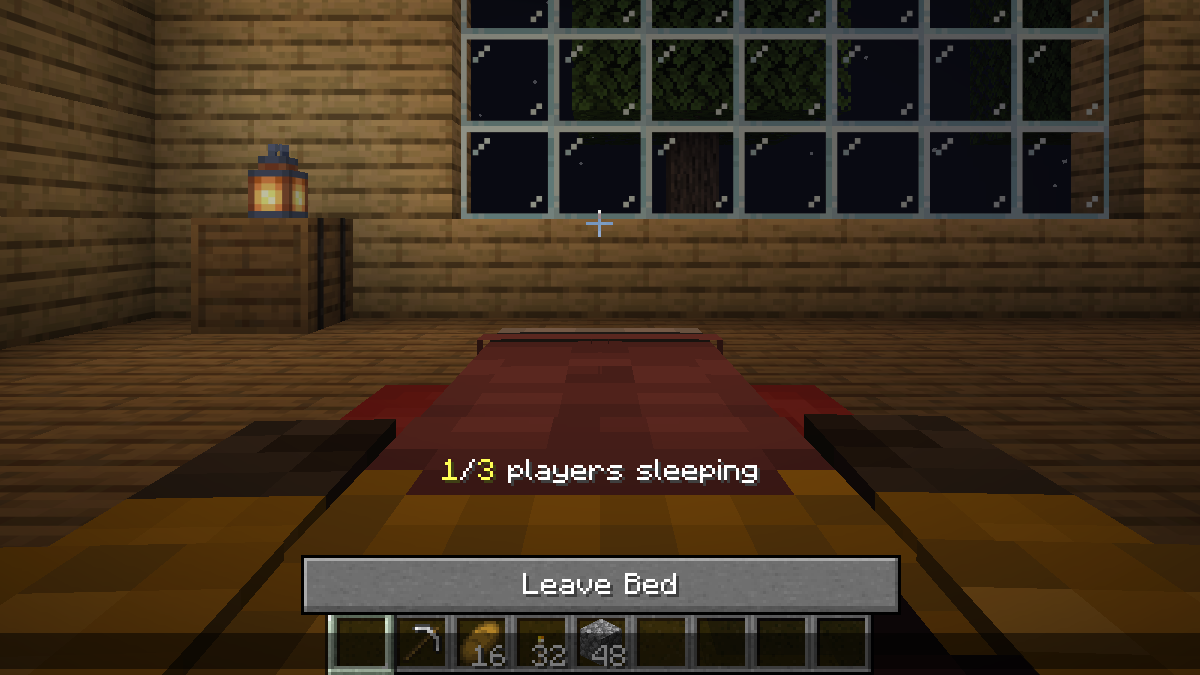
Aldren lies in bed for the separate reward example.Gameplay screenshot
A separate night: Aldren sleeps with Speed II enabled for one minute. Rewards are off by default.
The inventory shows the real Speed II reward earned after a successful sleep skip.Gameplay screenshot
After sleeping, Aldren receives Speed II for one minute. Mira and Kael stayed awake and received no effect.

Make it yours

Your world’s sleep rules, in one screen

Set fixed-count or percentage thresholds, separate rules for nights, daytime and thunderstorms, and optional rewards. Improved Sleep has world settings only; everyone uses the host’s rules.

  1. Install Improved Sleep, Fabric API, and Mod Menu on your computer to open the settings.
  2. While playing, open Mods → Improved Sleep → Configure. Choose the night, daytime, or thunderstorm rule you want to change.
  3. Press Save to apply it. You control your solo world; editing a multiplayer server requires the server mod and operator permission.

Mod Menu is optional client software and the main in-game settings entry. Install this mod, Fabric API and Mod Menu on your computer; open Mods, select the mod, then Configure.

Who can change what? Server Config controls the world hosted by this installation. You can edit a solo world; remote changes require the mod on the server and operator permission. Other players can inspect received settings. From the main menu, Server Config edits local hosting defaults, not a remote server.

Improved Sleep has Server Config only. There are no personal sleep-rule overrides: everyone uses the host's rules. Installing it only on a joining computer cannot change a remote server's sleep behavior.

Save and recover. Changes stay in a draft until Save succeeds. Done asks before discarding an unsaved draft. Defaults resets the editable scope in the draft; press Save to apply it. Wait for pending saves to finish. If permission or connection is lost, read the status and reconnect or regain permission before retrying.

Explore the settings screens

Open a screenshot to inspect the full window at its original size. Continue through the gallery to see the controls further down each screen.

All settings pages4 full-window screenshots

Settings reference

Open a group for its defaults, available controls and dependent options.

Server featuresWorld

Choose whether Improved Sleep controls the world.

Defaults: Enabled.

Disabled restores Minecraft's sleep rules and prevents custom rewards.

Night rulesWorld

Choose how many players must sleep at night and when the world wakes.

Defaults: Sleep allowed; wake target Day; fixed count 1 (stored percentage 50).

Allow sleep reveals wake target and threshold controls. Choose Fixed count (1–999, capped to eligible players) or Percentage (1–100, rounded up). Spectators do not count. Only the selected threshold control is active. Frozen time prevents a time skip.

Thunderstorm rulesWorld

Thunderstorms use their own rule, during both day and night.

Defaults: Sleep allowed; wake target Day; fixed count 1 (stored percentage 50).

Allow sleep reveals wake target and threshold controls. Choose Fixed count (1–999, capped to eligible players) or Percentage (1–100, rounded up). Spectators do not count. Only the selected threshold control is active. Frozen time prevents a time skip.

Daytime rulesWorld

Choose whether players can nap during daytime and when they wake.

Defaults: Daytime sleep off; wake target Night; fixed count 1 (stored percentage 50).

Allow sleep reveals wake target and threshold controls. Choose Fixed count (1–999, capped to eligible players) or Percentage (1–100, rounded up). Spectators do not count. Only the selected threshold control is active. Frozen time prevents a time skip.

Sleep rewardsWorld

Grant selected temporary effects only to players in bed when an eligible time skip succeeds.

Defaults: All rewards off; shared duration one minute. When enabled without an explicit level, an effect uses its highest supported vanilla level.

Duration is 1–99 minutes. Each effect has its own toggle; multilevel effects have a level button that becomes available when enabled. Effects: Speed, Haste, Strength, Jump Boost, Regeneration, Resistance, Fire Resistance, Water Breathing, Invisibility, Night Vision, Health Boost, Absorption, Luck, Slow Falling, Conduit Power, Dolphin’s Grace, Hero of the Village and Breath of the Nautilus. Awake players and interrupted/frozen-time sleeps do not earn rewards.

Try it in your world

Follow these recipes using the existing settings controls.

One player sleeps; friends keep building

  1. Open Server Config → Sleep Rules and enable Allow sleep at night.
  2. Choose Threshold mode: Fixed count, set Required sleeping players to 1 and Wake on: Day; Save.
  3. Leave rewards disabled for this example. At night, one player stays in bed until the skip finishes; friends can remain awake.

What you should see: One eligible sleeper advances the world to morning. Nobody receives an effect in this example.

Server Config, page 1: night and thunderstorm rules use a fixed count of one and wake at day.Settings screenshot
Server Config, page 1: night and thunderstorm rules use a fixed count of one and wake at day.
Mira lies in bed at night; Kael stands beside the work area.Gameplay screenshot
Before: Mira is the only sleeper. Aldren watches; Kael stays awake. One sleeper is required; rewards are off.

Reward the player who sleeps

  1. Open Server Config → Sleep Rewards and enable Reward sleepers with Speed.
  2. Choose level II and Shared reward duration in minutes: 1, then Save. Rewards are off by default.
  3. Complete a night skip while you are in bed, then open your inventory. Players who stay awake receive no reward.

What you should see: The sleeper receives Speed II for one minute. The inventory example is taken one second after the reward is granted.

Server Config, page 2: daytime sleep off; optional Speed II for one minute on. Rewards are off by default.Settings screenshot
Server Config, page 2: daytime sleep off; optional Speed II for one minute on. Rewards are off by default.
Aldren lies in bed for the separate reward example.Gameplay screenshot
A separate night: Aldren sleeps with Speed II enabled for one minute. Rewards are off by default.

Step by step

Install & play

Match your game version before adding the mod.

Playing solo
Install in your Fabric game
Server owners
Required on the server
Joining players
You can join without installing it

Choose how you play. These instructions are for Minecraft Java Edition with Fabric; Bedrock Edition uses a different add-on system.

Single-playerInstall on your computer
  1. Set up Fabric for Minecraft 26.3

    Fabric Loader lets Minecraft run Fabric mods. In the official Minecraft Launcher, run this Minecraft version once, close the game, then use the Fabric installer to create a matching Fabric installation. If your launcher manages mods, create a Fabric instance for the same version.

  2. Download the mod and its requirements

    Open release 0.1.9+26.3 on Modrinth . Download the .jar file and every dependency marked “required”. Fabric API is a separate mod from Fabric Loader; add it if the release requires it.

  3. Put the files in the right folder

    With Minecraft closed, open the game folder for your Fabric installation. In the official launcher, go to Installations and use that installation’s folder button. Open or create a folder named mods, then place the downloaded .jar files inside. Leave the files as they are; do not unzip them.

  4. Launch Fabric and try the mod

    Select your Fabric installation in the launcher and press Play. Open a world to use the mod. Single-player runs its own local server, so you do not need to set up a separate server.

I run a multiplayer serverInstall for your world’s players
  1. Prepare a matching Fabric server

    Use Minecraft 26.3 and Fabric Loader. A standard vanilla, Paper, or Spigot server cannot load a Fabric mod. Your hosting panel may offer Fabric; otherwise follow the Fabric server setup guide.

  2. Add the mod while the server is stopped

    Back up your world, stop the server, then download this release and its required dependencies. Put the .jar files in the server’s mods folder.

  3. Restart and check the player requirements

    Start the server again. Joining players can play without installing this mod. An optional client installation may add features described on the project page.

I join someone else’s serverCheck with the server owner

The server owner must install this mod on the server. Adding it only to your own game will not enable its server features.

Your own installation is optional. You can join without it; check the project documentation if you want the optional client features.

Something isn’t working?
  • Game does not start: read the Fabric error for a missing dependency or version mismatch. Match Minecraft, Fabric, and the mod’s release requirements.
  • Game starts but nothing changes: check that you launched the Fabric installation and used its own mods folder. For multiplayer, check that the server has the mod too.
  • Need to adjust the behavior: use the mod’s documentation for its settings and support links.
Project documentation & support Fabric’s illustrated installation guide

This release

What’s new

0.1.9+26.3 on Modrinth ·

Changed

  • Fabric compatibility: Refreshed for Fabric Loader 0.20.1 and Fabric API 0.165.0+26.3 on Minecraft 26.3.

Notes

  • The minimums remain Fabric Loader 0.19.3 and Fabric API 0.160.5+26.3; newer compatible versions are accepted. Mod Menu remains optional.
  • Existing settings, defaults and gameplay behavior are unchanged.

Browse earlier releases on Modrinth